
Answers from your papers
Asking a question and getting an answer written only from the passages in your own papers, with each one cited.
Type a question in Search and press Answer from these papers. The workbench finds the passages first, exactly as a search would, and then asks a model to answer only from those passages.
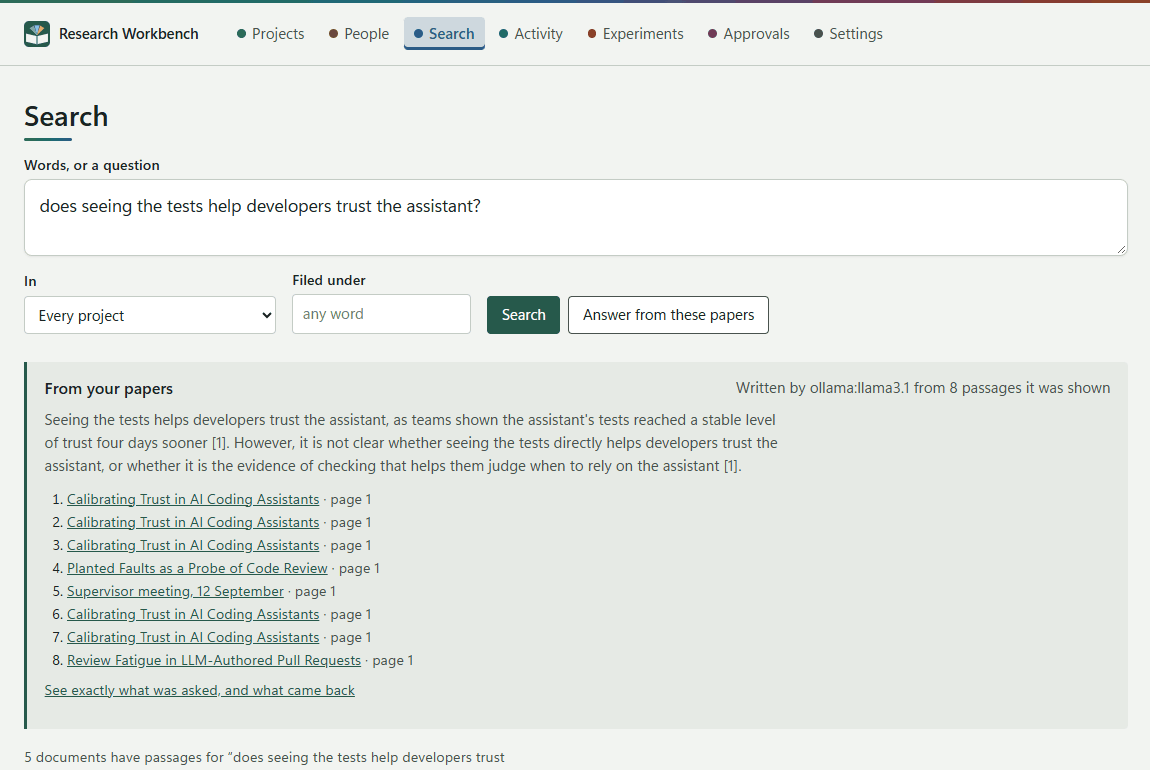
What you get
- From your papers: the answer, with numbered citations such as [1].
- Written by ollama:llama3.1 from 8 passages it was shown: which model wrote it, and from how many passages.
- The numbered passages, each linking to the paper at its page.
- See exactly what was asked, and what came back: this opens the evidence.
If the passages do not answer the question, the heading reads Not in your papers, and the model says what the passages do cover. It does not answer from its own memory.
How it works
- At most 8 passages, each sent whole, up to 2,000 characters.
- The model is asked repeatably: temperature 0, with a fixed seed.
- The model used is the one set for Answering from your own papers in Settings → Writing, or the general writing model.
- In and Filed under narrow the passages it may use, just as they narrow a search.
- Passages from documents whose label keeps them from the chosen model are left out.
Tip: An answer is a starting point for reading, not a finding. Open the passages it cites. The record in Evidence keeps exactly what the model saw, so you can always check how an answer came about.